

【漏洞通告】微软11月多个安全漏洞
发布时间 2025-11-12一、漏洞概述
2025年11月12日,启明星辰集团VSRC监测到微软发布了11月安全更新,本次更新修复了63个漏洞,涵盖特权提升、远程代码执行、信息泄露等多种漏洞类型。漏洞级别分布如下:5个严重级别漏洞,58个重要级别漏洞(漏洞级别依据微软官方数据)。
其中,6个漏洞被微软标记为“更可能被利用”及“检测利用情形”,表明这些漏洞存在较高的利用风险,建议优先修复以降低潜在安全威胁。
CVE-ID | CVE 标题 | 漏洞级别 |
CVE-2025-59512 | Customer Experience Improvement Program (CEIP) Elevation of Privilege Vulnerability | 重要 |
CVE-2025-60705 | Windows 客户端缓存特权提升漏洞 | 重要 |
CVE-2025-60719 | WinSock 的 Windows 辅助功能驱动程序特权提升漏洞 | 重要 |
CVE-2025-62213 | WinSock 的 Windows 辅助功能驱动程序特权提升漏洞 | 重要 |
CVE-2025-62217 | WinSock 的 Windows 辅助功能驱动程序特权提升漏洞 | 重要 |
CVE-2025-62215 | Windows 内核特权提升漏洞 | 重要 |
微软11月更新修复的完整漏洞列表如下:
CVE-ID | CVE 标题 | 漏洞级别 |
CVE-2025-30398 | Nuance PowerScribe 360 信息泄露漏洞 | 严重 |
CVE-2025-47179 | 配置管理器特权提升漏洞 | 重要 |
CVE-2025-59240 | Microsoft Excel 信息泄露漏洞 | 重要 |
CVE-2025-59499 | Microsoft SQL Server 特权提升漏洞 | 重要 |
CVE-2025-59504 | Azure Monitor 代理远程代码执行漏洞 | 重要 |
CVE-2025-59505 | Windows Smart Card Reader Elevation of Privilege Vulnerability | 重要 |
CVE-2025-59506 | DirectX 图形内核特权提升漏洞 | 重要 |
CVE-2025-59507 | Windows 语音运行时特权提升漏洞 | 重要 |
CVE-2025-59508 | Windows Speech Recognition Elevation of Privilege Vulnerability | 重要 |
CVE-2025-59509 | Windows Speech Recognition Information Disclosure Vulnerability | 重要 |
CVE-2025-59510 | Windows 路由和远程访问服务 (RRAS) 拒绝服务漏洞 | 重要 |
CVE-2025-59511 | Windows WLAN 服务特权提升漏洞 | 重要 |
CVE-2025-59512 | Customer Experience Improvement Program (CEIP) Elevation of Privilege Vulnerability | 重要 |
CVE-2025-59513 | Windows Bluetooth RFCOM Protocol Driver Information Disclosure Vulnerability | 重要 |
CVE-2025-59514 | Microsoft 流式处理代理特权提升漏洞 | 重要 |
CVE-2025-59515 | Windows Broadcast DVR User Service Elevation of Privilege Vulnerability | 重要 |
CVE-2025-60703 | Windows 远程桌面服务特权提升漏洞 | 重要 |
CVE-2025-60704 | Windows Kerberos 特权提升漏洞 | 重要 |
CVE-2025-60705 | Windows 客户端缓存特权提升漏洞 | 重要 |
CVE-2025-60706 | Windows Hyper-V 信息泄露漏洞 | 重要 |
CVE-2025-60707 | Multimedia Class Scheduler Service (MMCSS) Driver Elevation of Privilege Vulnerability | 重要 |
CVE-2025-60708 | Storvsp.sys Driver Denial of Service Vulnerability | 重要 |
CVE-2025-60709 | Windows 通用日志文件系统驱动程序提升权限漏洞 | 重要 |
CVE-2025-60710 | Host Process for Windows Tasks Elevation of Privilege Vulnerability | 重要 |
CVE-2025-60713 | Windows 路由和远程访问服务 (RRAS) 特权提升漏洞 | 重要 |
CVE-2025-60714 | Windows OLE 远程执行代码漏洞 | 重要 |
CVE-2025-60715 | Windows 路由和远程访问服务 (RRAS) 远程代码执行漏洞 | 重要 |
CVE-2025-60716 | DirectX 图形内核特权提升漏洞 | 严重 |
CVE-2025-60717 | Windows Broadcast DVR User Service Elevation of Privilege Vulnerability | 重要 |
CVE-2025-60718 | Windows Administrator Protection Elevation of Privilege Vulnerability | 重要 |
CVE-2025-60719 | WinSock 的 Windows 辅助功能驱动程序特权提升漏洞 | 重要 |
CVE-2025-60720 | Windows 传输驱动程序接口 (TDI) 转换驱动程序特权提升漏洞 | 重要 |
CVE-2025-60721 | Windows Administrator Protection Elevation of Privilege Vulnerability | 重要 |
CVE-2025-60722 | Microsoft OneDrive for Android Elevation of Privilege Vulnerability | 重要 |
CVE-2025-60723 | DirectX 图形内核拒绝服务漏洞 | 重要 |
CVE-2025-60724 | GDI 远程执行代码漏洞 | 严重 |
CVE-2025-60726 | Microsoft Excel 信息泄露漏洞 | 重要 |
CVE-2025-60727 | Microsoft Excel 远程执行代码漏洞 | 重要 |
CVE-2025-60728 | Microsoft Excel 信息泄露漏洞 | 重要 |
CVE-2025-62199 | Microsoft Office 远程执行代码漏洞 | 严重 |
CVE-2025-62200 | Microsoft Excel 远程执行代码漏洞 | 重要 |
CVE-2025-62201 | Microsoft Excel 远程执行代码漏洞 | 重要 |
CVE-2025-62202 | Microsoft Excel 信息泄露漏洞 | 重要 |
CVE-2025-62203 | Microsoft Excel 远程执行代码漏洞 | 重要 |
CVE-2025-62204 | Microsoft SharePoint 远程执行代码漏洞 | 重要 |
CVE-2025-62205 | Microsoft Office 远程执行代码漏洞 | 重要 |
CVE-2025-62206 | Microsoft Dynamics 365(本地)信息泄露漏洞 | 重要 |
CVE-2025-62208 | Windows License Manager Information Disclosure Vulnerability | 重要 |
CVE-2025-62209 | Windows License Manager Information Disclosure Vulnerability | 重要 |
CVE-2025-62210 | Dynamics 365 Field Service(在线)欺骗漏洞 | 重要 |
CVE-2025-62211 | Dynamics 365 Field Service(在线)欺骗漏洞 | 重要 |
CVE-2025-62213 | WinSock 的 Windows 辅助功能驱动程序特权提升漏洞 | 重要 |
CVE-2025-62214 | Visual Studio 远程执行代码漏洞 | 严重 |
CVE-2025-62215 | Windows 内核特权提升漏洞 | 重要 |
CVE-2025-62216 | Microsoft Office 远程执行代码漏洞 | 重要 |
CVE-2025-62217 | WinSock 的 Windows 辅助功能驱动程序特权提升漏洞 | 重要 |
CVE-2025-62218 | Microsoft Wireless Provisioning System Elevation of Privilege Vulnerability | 重要 |
CVE-2025-62219 | Microsoft Wireless Provisioning System Elevation of Privilege Vulnerability | 重要 |
CVE-2025-62220 | Windows Subsystem for Linux GUI Remote Code Execution Vulnerability | 重要 |
CVE-2025-62222 | 智能体AI 与 Visual Studio Code 远程代码执行漏洞 | 重要 |
CVE-2025-62449 | Microsoft Visual Studio Code CoPilot Chat Extension Security Feature Bypass Vulnerability | 重要 |
CVE-2025-62452 | Windows 路由和远程访问服务 (RRAS) 远程代码执行漏洞 | 重要 |
CVE-2025-62453 | GitHub Copilot and Visual Studio Code Security Feature Bypass Vulnerability | 重要 |
二、影响范围
受影响的产品/功能/服务/组件包括:
Nuance PowerScribe
Microsoft Configuration Manager
Microsoft Office Excel
SQL Server
Azure Monitor Agent
Windows Smart Card
Windows DirectX
Windows Speech
Windows Routing and Remote Access Service (RRAS)
Windows WLAN Service
Customer Experience Improvement Program (CEIP)
Windows Bluetooth RFCOM Protocol Driver
Microsoft Streaming Service
Windows Broadcast DVR User Service
Windows Remote Desktop
Windows Kerberos
Windows Client-Side Caching (CSC) Service
Role: Windows Hyper-V
Multimedia Class Scheduler Service (MMCSS)
Storvsp.sys Driver
Windows Common Log File System Driver
Host Process for Windows Tasks
Windows OLE
Windows Administrator Protection
Windows Ancillary Function Driver for WinSock
Windows TDX.sys
OneDrive for Android
Microsoft Graphics Component
Microsoft Office
Microsoft Office SharePoint
Microsoft Office Word
Microsoft Dynamics 365 (on-premises)
Windows License Manager
Dynamics 365 Field Service (online)
Visual Studio
Windows Kernel
Microsoft Wireless Provisioning System
Windows Subsystem for Linux GUI
Visual Studio Code CoPilot Chat Extension
GitHub Copilot and Visual Studio Code
三、安全措施
3.1 升级版本
目前微软已发布相关安全更新,建议受影响的用户尽快修复。
(一)Windows Update自动更新
Microsoft Update默认启用,当系统检测到可用更新时,将会自动下载更新并在下一次启动时安装。也可选择通过以下步骤手动进行更新:
1、点击“开始菜单”或按Windows快捷键,点击进入“设置”
2、选择“更新和安全”,进入“Windows更新”(Windows 8、Windows 8.1、Windows Server 2012以及Windows Server 2012 R2可通过控制面板进入“Windows更新”,具体步骤为“控制面板”->“系统和安全”->“Windows更新”)
3、选择“检查更新”,等待系统自动检查并下载可用更新。
4、更新完成后重启计算机,可通过进入“Windows更新”->“查看更新历史记录”查看是否成功安装了更新。对于没有成功安装的更新,可以点击该更新名称进入微软官方更新描述链接,点击最新的SSU名称并在新链接中点击“Microsoft 更新目录”,然后在新链接中选择适用于目标系统的补丁进行下载并安装。
(二)手动安装更新
Microsoft官方下载相应补丁进行更新。
2025年11月安全更新下载链接:
https://msrc.microsoft.com/update-guide/releaseNote/2025-Nov
补丁下载示例(参考):
1.打开上述下载链接,点击漏洞列表中要修复的CVE链接。
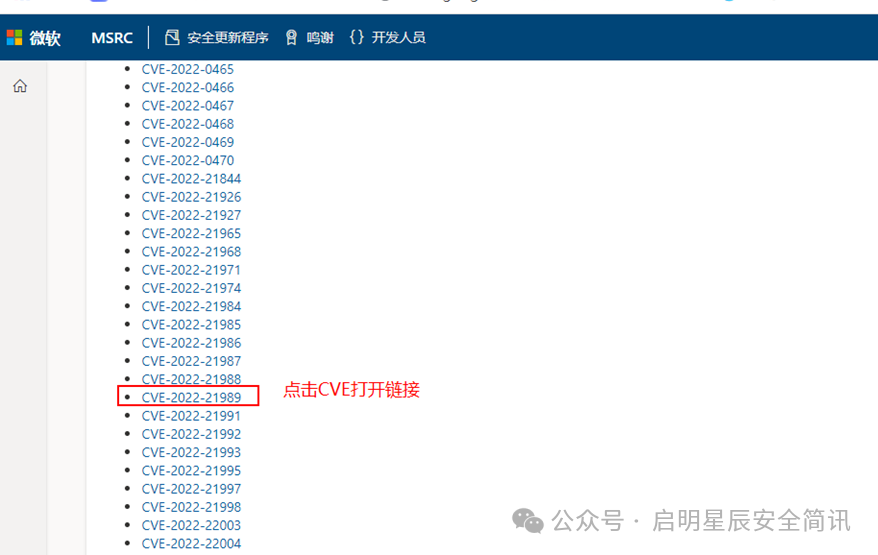
例1:微软漏洞列表(示例)
2.在微软公告页面底部左侧【产品】列选择相应的系统类型,点击右侧【下载】列打开补丁下载链接。
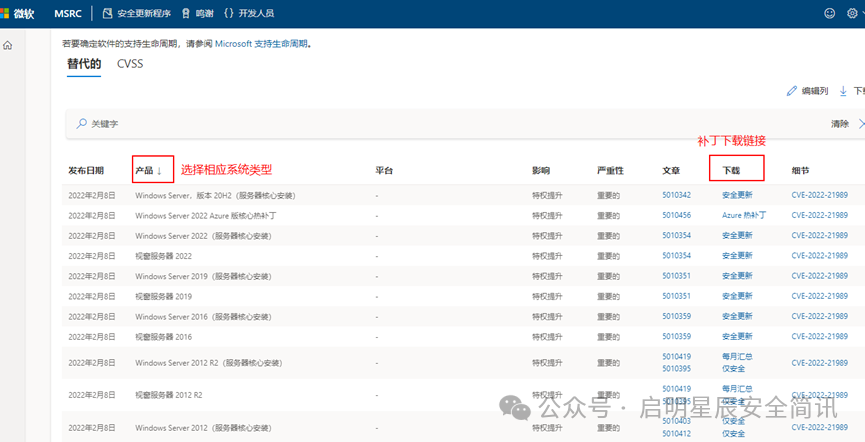
例2:CVE-2022-21989补丁下载示例
3.点击【安全更新】,打开补丁下载页面,下载相应补丁并进行安装。
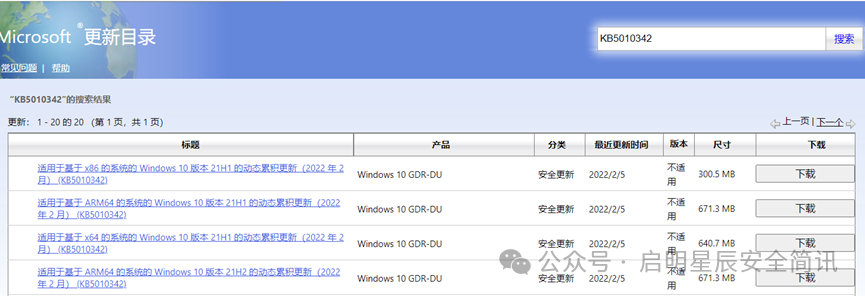
例3:补丁下载界面
4.安装完成后重启计算机。
3.2 临时措施
暂无。
3.3 通用建议
• 定期更新系统补丁,减少系统漏洞,提升服务器的安全性。
• 加强系统和网络的访问控制,修改防火墙策略,关闭非必要的应用端口或服务,减少将危险服务(如SSH、RDP等)暴露到公网,减少攻击面。
• 使用企业级安全产品,提升企业的网络安全性能。
• 加强系统用户和权限管理,启用多因素认证机制和最小权限原则,用户和软件权限应保持在最低限度。
• 启用强密码策略并设置为定期修改。
3.4 参考链接
https://msrc.microsoft.com/update-guide/releaseNote/2025-Nov


 京公网安备11010802024551号