

【漏洞通告】微软3月多个安全漏洞
发布时间 2026-03-11一、漏洞概述
2026年3月11日,启明星辰安全应急响应中心(VSRC)监测到微软发布了3月安全更新,本次更新修复了83个漏洞,涵盖特权提升、远程代码执行、信息泄露等多种漏洞类型。漏洞级别分布如下:8个严重级别漏洞,75个重要级别漏洞(漏洞级别依据微软官方数据)。
其中,6个漏洞被微软标记为“更可能被利用”及“检测利用情形”,表明这些漏洞存在较高的利用风险,建议优先修复以降低潜在安全威胁。
CVE-ID | CVE 标题 | 漏洞级别 |
CVE-2026-23668 | Windows 图形组件特权提升漏洞 | 重要 |
CVE-2026-24289 | Windows 内核特权提升漏洞 | 重要 |
CVE-2026-24291 | Windows 辅助功能基础设施 (ATBroker.exe) 特权提升漏洞 | 重要 |
CVE-2026-24294 | Windows SMB Server Elevation of Privilege Vulnerability | 重要 |
CVE-2026-25187 | Winlogon 特权提升漏洞 | 重要 |
CVE-2026-26132 | Windows 内核特权提升漏洞 | 重要 |
微软3月更新修复的完整漏洞列表如下:
CVE-ID | CVE 标题 | 漏洞级别 |
CVE-2026-20967 | System Center Operations Manager (SCOM) 特权提升漏洞 | 重要 |
CVE-2026-21262 | SQL 服务器特权提升漏洞 | 重要 |
CVE-2026-21536 | Microsoft 设备定价计划远程代码执行漏洞 | 严重 |
CVE-2026-23651 | Microsoft ACI 保密容器特权提升漏洞 | 严重 |
CVE-2026-23654 | GitHub:Zero Shot SCFoundation 远程代码执行漏洞 | 重要 |
CVE-2026-23656 | Windows 应用安装程序欺骗漏洞 | 重要 |
CVE-2026-23660 | Azure 门户中的 Windows Admin Center 特权提升漏洞 | 重要 |
CVE-2026-23661 | Azure IoT Explorer 信息泄露漏洞 | 重要 |
CVE-2026-23662 | Azure IoT Explorer 信息泄露漏洞 | 重要 |
CVE-2026-23664 | Azure IoT Explorer 信息泄露漏洞 | 重要 |
CVE-2026-23665 | Linux Azure 诊断扩展 (LAD) 特权提升漏洞 | 重要 |
CVE-2026-23667 | 广播DVR 特权提升漏洞 | 重要 |
CVE-2026-23668 | Windows 图形组件特权提升漏洞 | 重要 |
CVE-2026-23669 | Windows 打印后台处理程序远程执行代码漏洞 | 重要 |
CVE-2026-23671 | Windows 蓝牙 RFCOMM 协议驱动程序特权提升漏洞 | 重要 |
CVE-2026-23672 | Windows 通用磁盘格式文件系统驱动程序 (UDFS) 特权提升漏洞 | 重要 |
CVE-2026-23673 | Windows Resilient 文件系统 (ReFS) 特权提升漏洞 | 重要 |
CVE-2026-23674 | MapUrlToZone 安全功能绕过漏洞 | 重要 |
CVE-2026-24282 | 推送消息路由服务特权提升漏洞 | 重要 |
CVE-2026-24283 | 多UNC 提供程序内核驱动程序特权提升漏洞 | 重要 |
CVE-2026-24285 | Win32k 特权提升漏洞 | 重要 |
CVE-2026-24287 | Windows 内核特权提升漏洞 | 重要 |
CVE-2026-24288 | Windows 移动宽带驱动程序远程代码执行漏洞 | 重要 |
CVE-2026-24289 | Windows 内核特权提升漏洞 | 重要 |
CVE-2026-24290 | Windows 投影文件系统特权提升漏洞 | 重要 |
CVE-2026-24291 | Windows 辅助功能基础设施 (ATBroker.exe) 特权提升漏洞 | 重要 |
CVE-2026-24292 | Windows 互联设备平台服务特权提升漏洞 | 重要 |
CVE-2026-24293 | WinSock 的 Windows 辅助功能驱动程序特权提升漏洞 | 重要 |
CVE-2026-24294 | Windows SMB Server Elevation of Privilege Vulnerability | 重要 |
CVE-2026-24295 | Windows 设备关联服务特权提升漏洞 | 重要 |
CVE-2026-24296 | Windows 设备关联服务特权提升漏洞 | 重要 |
CVE-2026-24297 | Windows Kerberos 安全功能绕过漏洞 | 重要 |
CVE-2026-25165 | 针对Windows 特权提升漏洞的性能计数器 | 重要 |
CVE-2026-25166 | Windows 系统映像管理器评估和部署工具包 (ADK) 远程代码执行漏洞 | 重要 |
CVE-2026-25167 | Microsoft 代理文件系统特权提升漏洞 | 重要 |
CVE-2026-25168 | Windows 图形组件拒绝服务漏洞 | 重要 |
CVE-2026-25169 | Windows 图形组件拒绝服务漏洞 | 重要 |
CVE-2026-25170 | Windows Hyper-V 特权提升漏洞 | 重要 |
CVE-2026-25171 | Windows 身份验证特权提升漏洞 | 重要 |
CVE-2026-25172 | Windows 路由和远程访问服务 (RRAS) 远程代码执行漏洞 | 重要 |
CVE-2026-25173 | Windows 路由和远程访问服务 (RRAS) 远程代码执行漏洞 | 重要 |
CVE-2026-25174 | Windows 可扩展文件分配表特权提升漏洞 | 重要 |
CVE-2026-25175 | Windows NTFS 特权提升漏洞 | 重要 |
CVE-2026-25176 | WinSock 的 Windows 辅助功能驱动程序特权提升漏洞 | 重要 |
CVE-2026-25177 | Active Directory Domain Services Elevation of Privilege Vulnerability | 重要 |
CVE-2026-25178 | WinSock 的 Windows 辅助功能驱动程序特权提升漏洞 | 重要 |
CVE-2026-25179 | WinSock 的 Windows 辅助功能驱动程序特权提升漏洞 | 重要 |
CVE-2026-25180 | Windows 图形组件信息泄露漏洞 | 重要 |
CVE-2026-25181 | GDI+ 信息泄露漏洞 | 重要 |
CVE-2026-25185 | Windows Shell 链接处理欺骗漏洞 | 重要 |
CVE-2026-25186 | Windows 辅助功能基础设施 (ATBroker.exe) 信息泄露漏洞 | 重要 |
CVE-2026-25187 | Winlogon 特权提升漏洞 | 重要 |
CVE-2026-25188 | Windows 电话服务特权提升漏洞 | 重要 |
CVE-2026-25189 | Windows DWM 核心库特权提升漏洞 | 重要 |
CVE-2026-25190 | GDI 远程执行代码漏洞 | 重要 |
CVE-2026-26105 | Microsoft SharePoint Server 欺骗漏洞 | 重要 |
CVE-2026-26106 | Microsoft SharePoint Server 远程执行代码漏洞 | 重要 |
CVE-2026-26107 | Microsoft Excel 远程执行代码漏洞 | 重要 |
CVE-2026-26108 | Microsoft Excel 远程执行代码漏洞 | 重要 |
CVE-2026-26109 | Microsoft Excel 远程执行代码漏洞 | 重要 |
CVE-2026-26110 | Microsoft Office 远程执行代码漏洞 | 严重 |
CVE-2026-26111 | Windows 路由和远程访问服务 (RRAS) 远程代码执行漏洞 | 重要 |
CVE-2026-26112 | Microsoft Excel 远程执行代码漏洞 | 重要 |
CVE-2026-26113 | Microsoft Office 远程执行代码漏洞 | 严重 |
CVE-2026-26114 | Microsoft SharePoint Server 远程执行代码漏洞 | 重要 |
CVE-2026-26115 | SQL 服务器特权提升漏洞 | 重要 |
CVE-2026-26116 | SQL 服务器特权提升漏洞 | 重要 |
CVE-2026-26117 | 已启用Arc 的服务器 - Azure Connected Machine Agent 特权提升漏洞 | 重要 |
CVE-2026-26118 | Azure MCP 服务器工具特权提升漏洞 | 重要 |
CVE-2026-26121 | Azure IOT Explorer 欺骗漏洞 | 重要 |
CVE-2026-26122 | Microsoft ACI 保密容器信息泄露漏洞 | 严重 |
CVE-2026-26123 | Microsoft Authenticator 信息泄露漏洞 | 重要 |
CVE-2026-26124 | Microsoft ACI 保密容器特权提升漏洞 | 严重 |
CVE-2026-26125 | 支付业务流程协调程序服务特权提升漏洞 | 严重 |
CVE-2026-26127 | .NET 拒绝服务漏洞 | 重要 |
CVE-2026-26128 | Windows SMB Server Elevation of Privilege Vulnerability | 重要 |
CVE-2026-26130 | ASP.NET Core 拒绝服务漏洞 | 重要 |
CVE-2026-26131 | .NET 特权提升漏洞 | 重要 |
CVE-2026-26132 | Windows 内核特权提升漏洞 | 重要 |
CVE-2026-26134 | Microsoft Office 特权提升漏洞 | 重要 |
CVE-2026-26141 | 混合辅助角色扩展(启用Arc 的 Windows VM)特权提升漏洞 | 重要 |
CVE-2026-26144 | Microsoft Excel 信息泄露漏洞 | 严重 |
CVE-2026-26148 | 针对Linux 特权提升漏洞的 Microsoft Azure AD SSH 登录扩展 | 重要 |
二、影响范围
受影响的产品/功能/服务/组件包括:
System Center Operations Manager
SQL Server
Microsoft Devices Pricing Program
Azure Compute Gallery
GitHub Repo: zero-shot-scfoundation
Windows App Installer
Azure Portal Windows Admin Center
Azure IoT Explorer
Azure Linux Virtual Machines
Broadcast DVR
Microsoft Graphics Component
Windows Print Spooler Components
Windows Bluetooth RFCOM Protocol Driver
Windows Universal Disk Format File System Driver (UDFS)
Windows Resilient File System (ReFS)
Windows MapUrlToZone
Push Message Routing Service
Windows File Server
Windows Win32K
Windows Kernel
Windows Mobile Broadband
Windows Projected File System
Windows Accessibility Infrastructure (ATBroker.exe)
Connected Devices Platform Service (Cdpsvc)
Windows Ancillary Function Driver for WinSock
Windows SMB Server
Windows Device Association Service
Windows Kerberos
Windows Performance Counters
Windows System Image Manager
Microsoft Brokering File System
Role: Windows Hyper-V
Windows Authentication Methods
Windows Routing and Remote Access Service (RRAS)
Windows Extensible File Allocation
Windows NTFS
Active Directory Domain Services
Windows GDI+
Windows Shell Link Processing
Winlogon
Windows Telephony Service
Windows DWM Core Library
Windows GDI
Microsoft Office SharePoint
Microsoft Office Excel
Microsoft Office
Azure Windows Virtual Machine Agent
Azure MCP Server
Microsoft Authenticator
Payment Orchestrator Service
.NET
ASP.NET Core
Azure Arc
Azure Entra ID
三、安全措施
3.1 升级版本
目前微软已发布相关安全更新,建议受影响的用户尽快修复。
(一)Windows Update自动更新
Microsoft Update默认启用,当系统检测到可用更新时,将会自动下载更新并在下一次启动时安装。也可选择通过以下步骤手动进行更新:
1、点击“开始菜单”或按Windows快捷键,点击进入“设置”
2、选择“更新和安全”,进入“Windows更新”(Windows 8、Windows 8.1、Windows Server 2012以及Windows Server 2012 R2可通过控制面板进入“Windows更新”,具体步骤为“控制面板”->“系统和安全”->“Windows更新”)
3、选择“检查更新”,等待系统自动检查并下载可用更新。
4、更新完成后重启计算机,可通过进入“Windows更新”->“查看更新历史记录”查看是否成功安装了更新。对于没有成功安装的更新,可以点击该更新名称进入微软官方更新描述链接,点击最新的SSU名称并在新链接中点击“Microsoft 更新目录”,然后在新链接中选择适用于目标系统的补丁进行下载并安装。
(二)手动安装更新
Microsoft官方下载相应补丁进行更新。
2026年3月安全更新下载链接:
https://msrc.microsoft.com/update-guide/releaseNote/2026-Mar
补丁下载示例(参考):
1.打开上述下载链接,点击漏洞列表中要修复的CVE链接。
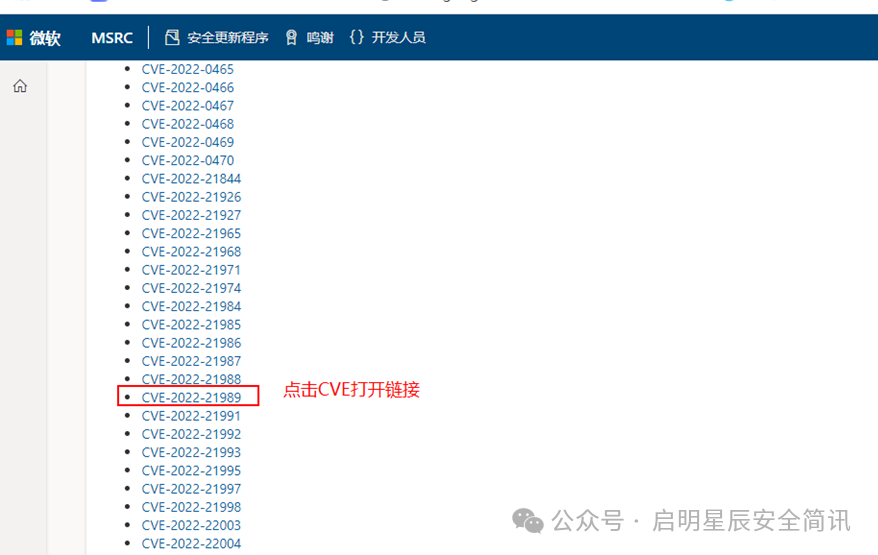
例1:微软漏洞列表(示例)
2.在微软公告页面底部左侧【产品】列选择相应的系统类型,点击右侧【下载】列打开补丁下载链接。
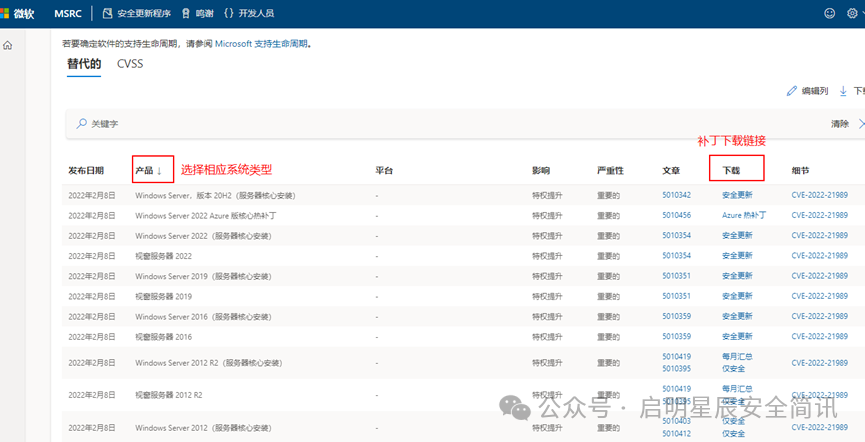
例2:CVE-2022-21989补丁下载示例
3.点击【安全更新】,打开补丁下载页面,下载相应补丁并进行安装。
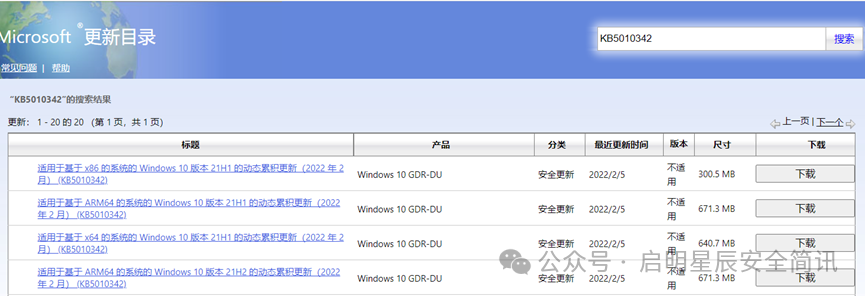
例3:补丁下载界面
4.安装完成后重启计算机。
3.2 临时措施
暂无。
3.3 通用建议
• 定期更新系统补丁,减少系统漏洞,提升服务器的安全性。
• 加强系统和网络的访问控制,修改防火墙策略,关闭非必要的应用端口或服务,减少将危险服务(如SSH、RDP等)暴露到公网,减少攻击面。
• 使用企业级安全产品,提升企业的网络安全性能。
• 加强系统用户和权限管理,启用多因素认证机制和最小权限原则,用户和软件权限应保持在最低限度。
• 启用强密码策略并设置为定期修改。


 京公网安备11010802024551号